Blog

  • Can’t fish Ethernet? Use “invisible” fiber instead.

    My family owns a NYC townhouse, and with that I had Cat6 cables put in on each floor.

    However, more recently, one of the Cat6 cables has gone “bad,” meaning it only does 100 Mbps. While we are nowhere close to Gigabit speeds, very less multi-Gig (despite me having had symmetric Gigabit in the past), it’s still not something I’m happy about.
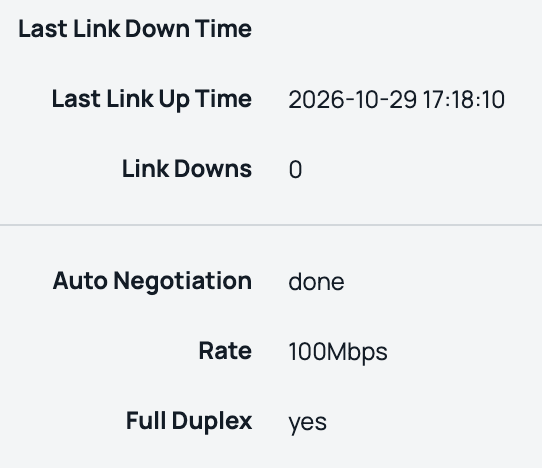
    What do you mean only 100 Mbps? My switch and AP support 2.5 Gbps.

    The most common approaches in my scenario are:

    • Fish a new cable
    • Abandon the cable and use wireless mesh

    However, there are a few issues:

    • The cables were fished in a funky way, and considering how clumsy I am I don’t want to cause more damage
    • Our walls are thick, meaning wireless mesh would suck

    When I did use mesh on HPE AP25s (the APs I use), the performance was 120 Mbps at two prior homes, that with thin walls and fiber. I also want VLAN segmentation so a typical consumer Eero or Orbi won’t work.

    So what did I do? “Invisible” fiber between two floors.

    In case you didn’t know, there are special types of fiber cables originally designed for apartment retrofits. This is to avoid landlord/HOA complaints. Our prior place had Verizon Fios via these cables in the hallway.

    But these cables are also sold on Amazon and AliExpress for people who’re in rentals or don’t want to fish cables.

    So how did I do it?
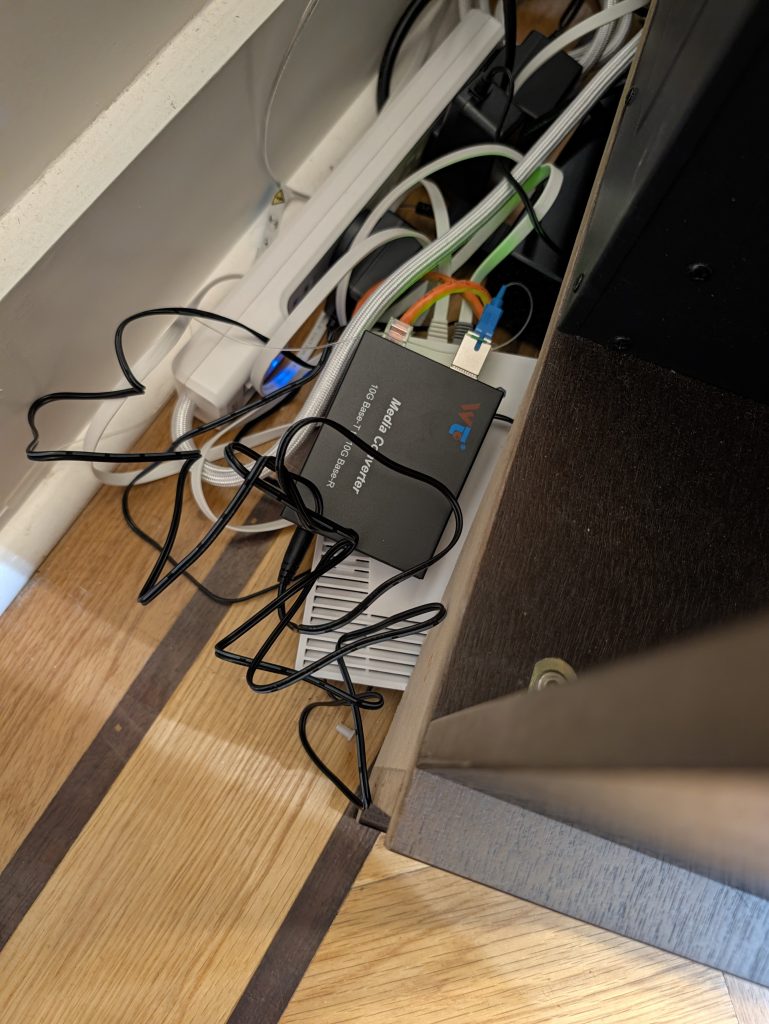
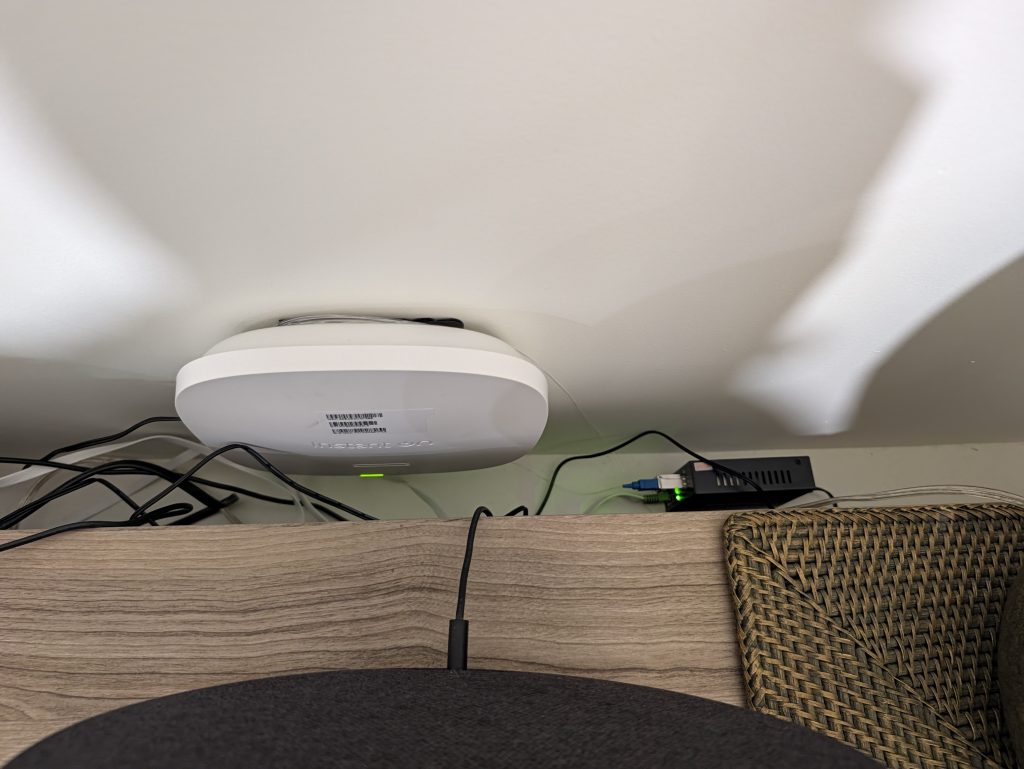
    Galore, the endpoints of my 20m/60ft ‘fiber in the home’ loop.

    Switch

    While there are SFP+ switches, I already had an unused MikroTik CRS304-4XG-IN, so I just used it here. It’s technically copper 10G, but I’d lose more by trading it for a SFP+ switch so I’ll just keep it. Not to mention copper SFP+s get hot.

    Media Converters and Transceivers

    I used two media converters and a pair of bidirectional SC SFP+s.

    The SFP+s use the same SC connector used in PON networks, but otherwise use Active Ethernet. I’m not sure if they’re using IEEE standards or are proprietary on the glass, but I’ll assume the latter.

    While there’s copper on the media converters, the other option would be to replace our switch which I’ve mentioned is not the best idea.

    The Fiber

    While the fiber can (and is designed to) be superglued, I chose to use the included adhesive instead. Why? In case I ever have to remove it, which has happened before.

    That’s the same reason why I did the basement AP25 using command strips when everyone else just drills the mount.

    While our fiber is UPC, our transceivers support both SC fiber types.

    Conclusion

    If I look at the Instant On portal, I’m posting this from my MacBook connected to the new ‘fiber in the home’ loop (via an HPE AP25).

    While we currently lack fiber-to-the-home (Mamdani, please fix Fios rights of way!), I’m still happy I could DIY a fix for a Cat6 cable with bad pairs.

    In fact, while I don’t have multi-Gig I could still get a respectable ~300 Mbps:
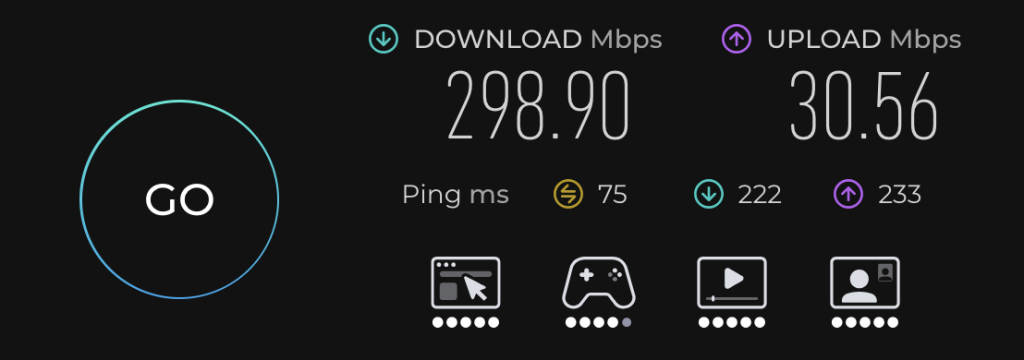
    So yes, even if you don’t have fiber to the home, fiber is still useful in a home network. As it saved me from having to hire a contractor and possibly tear our walls. Not to mention a $1500 Samsung TV is on the wall the “defective” Cat6 cable is behind.
  • MikroTik CRS312-4C+8XG-RM: Combo SFP+/RJ-45 ports not detecting SFP+ on modern RouterOS versions

    I re-purchased a MikroTik CRS312-4C+8XG-RM off eBay after selling mine (which I had for 4.5 years) this January. This is to provide network to four HPE Instant On AP25s across our townhouse via 2.5G copper (which are DC powered now), as well as my Intel 285K desktop and lab bench via 10G copper

    One problem with the CRS312-4C+8XG-RM on newer RouterOS versions is that the combo port doesn’t autodetect out of the box. You are basically stuck manually setting it yourself, or using RJ-45. Or are you?

    However, this is easy to change. To fix it:

    /interface ethernet
    set [ find default-name=comboX ] combo-mode=sfp

    Replace X with the combo port you want as a SFP+. This can be done for one or more ports.

    This way, I can connect it to a CRS317-1G-16S+RM (my core switch) in VLAN trunk mode.

  • Elon Musk isn’t an engineer or manager. He’s an influencer and lobbyist.

    I’ve been hearing about Starlink Mobile. From Big Wireless stocks tanking to one of my mom’s stocks (American Tower) rising.

    But while I don’t go on LinkedIn often, I heard criticism there about how Elon Musk is going to support Starlink Mobile.

    This made me think, Elon Musk isn’t actually a good engineer or CEO. He makes Carly Fiorina who wrecked HP look good. Elon Musk is a good influencer, combined with lobbying power. Yes, Fiorina tried in politics, but failed big time.

    Elon Musk’s products are terrible. For instance:

    But what Elon Musk is good at is maintaining a following and pushing his views.

    Unlike traditional influencers such as MrBeast, Charli D’Amelio, or whoever is trending on TikTok (I don’t keep track) Musk owns a platform: X (formerly Twitter).

    Even before he bought Twitter, he used it to hype his businesses. How did Tesla or Starlink get hype? Elon Musk.

    Elon Musk goes further. He is one of the most effective lobbyists. For instance:

    • SpaceX has major government contracts
    • He got Donald Trump and Republicans elected in 2024
    • He ran DOGE to do mass layoffs of any agency “regulating” and “investigating” his businesses

    How does he lobby? Instead of influencing politicians via lobbying firms (although he does this too), he influences X users in favor of right-wing politics by the algorithm. Then if it goes well for Musk, they vote for the GOP.

    In fact, when I set up an X account for my small business Fourplex, I got conservative content by the algorithm. I had to follow a whole bunch of liberals to not get right-wing propaganda.

    Basically, if you aren’t a visible Bernie, AOC or Mamdani fan to X, you get conservative posts. My old X account (before I canned it) had left-wing posts since I was following left-wing accounts.

    The political influencer can also apply to others, like:

    • Donald Trump, who got elected twice, has deep MAGA fans despite his general unpopularity, and used Twitter and now his own Truth Social as a megaphone.
    • Alexandria Ocasio-Cortez, who while progressive, not rich and doesn’t own a platform has a massive following and is basically a celebrity.

    There are also many others.

    Don’t get me wrong, as a progressive I want an AOC presidency as much as the next leftie.

    But going back, in today’s world, having a successful business or political career is no longer about just being good at your craft. It’s about being a good influencer who gets 500K likes on TikTok or X.

    Elon Musk and Donald Trump mastered social media, so they dominate politics. Maybe unless Democrats sweep Congress come November 3, 2026. And even after that, if you want to be president or big in politics (Musk, AOC, etc.), you need to be an influencer.

  • Running WireGuard over HTTPS via Chisel, or how to bypass your hotel’s firewall

    Right now, I am visiting Amsterdam. While Amsterdam is a nice city and I like my hotel, one of the worst parts is the hotel’s Wi-Fi.

    The Wi-Fi is heavily firewalled. Meaning only mainstream TCP services are allowed. While SSH is allowed, Wireguard isn’t.

    But I discovered Chisel, which lets you proxy TCP or UDP over HTTP and WebSocket.

    So how do you run Chisel?

    Installation

    On a web server, download the latest version of Chisel.

    While most of you are going to run Debian or Ubuntu, I run Rocky Linux as a server so Chisel can be installed with a single dnf command:

    dnf install https://github.com/jpillora/chisel/releases/download/v1.11.8/chisel_1.11.8_linux_amd64.rpm

    You can also install it as a Docker container.

    Running Chisel as a Server

    Assuming you aren’t running Docker or Windows:

    chisel server --auth user:pass --port port --backend http://example.com

    Replace the following:

    • user with your desired username
    • pass with your desired password
    • port with the TCP port you want Chisel to listen on

    You can also set up a systemd service. I am lazy so I used tmux.

    I also recommend a reverse proxy. I use Caddy, so to do it, assuming you have the DNS name domain pointed to your server, add the following server block:

    domain {
      encode gzip
      reverse_proxy 127.0.0.1:port
    }

    Make sure port is the Chisel port, and then restart Caddy.

    If you use nginx or another reverse proxy, check the respective instructions.

    Running Chisel as a Client

    I am accessing Chisel on Fedora, so the dnf command also worked there.

    To run Chisel as a client, run the following in your terminal:

    chisel client --auth user:pass https://url local_port:remote_ip:remote_port/udp
    • user with your chosen username
    • pass with your chosen password
    • local_port with the UDP port you want to listen on locally
    • remote_ip with the remote IP you want to connect to
    • remote_port with the UDP port you want to connect to

    You can also remove /udp to connect via TCP.

    Conclusion

    It always sucks when the expensive hotel your family booked blocks most TCP/IP services. But the good thing about open source is that you can tunnel raw UDP and TCP inside HTTPS.

    Yes, China spends unlimited amounts of money on internet censorship. But for-profit hotels, workplaces, public libraries and ISPs who purposefully violate Net Neutrality cannot. And in the latter case, firewalling shouldn’t mean you shouldn’t be able to access your homelab.

  • Fedora Linux on an Asus Zenbook S14 UX5406AA

    I’ve been wanting a Linux Laptop with a good display for a while. For years my go-to option for non-Apple laptops was HP (mostly) but I got tired of the poor displays.

    I picked up an Asus Zenbook S14 UX5406AA today, since I wanted a good display and Best Buy was running a sale.

    I’m very impressed with the Zenbook: the hardware is way ahead of other high-end PC laptops I used; HP EliteBook/OmniBook/Spectre, Dell XPS and Lenovo ThinkPad (yes, ThinkPads are actually unreliable).

    However, to no surprise the Asus Zenbook has out-of-the-box issues with Fedora, and probably other Linux distros. It can be worked around if you don’t mind using Fedora 45 beta as of August 2026.

    Brightness

    By default, the brightness runs at 100%. This can be solved using grubby:

    grubby --update-kernel=ALL --args="xe.enable_dpcd_backlight=1"

    This makes the brightness works out-of-the-box.

    If you’re running a non-Red Hat-based Linux distribution (i.e. Arch, Ubuntu) the commands are different.

    Audio

    Audio also doesn’t work out-of-the-box on Fedora 44, even with the latest packaged kernel. This is because there’s a “ghost” Realtek audio codec when the real HD Audio codec is Cirrus Logic.

    Audio works after working to Fedora 45 beta with Kernel 7.2. Although I normally use Sony Bluetooth earbuds.

    9/13/26 UPDATE: Linux 7.2.5 is now in Fedora 44’s dnf repositories. This means audio works with Fedora 44, which I downgraded to after F45’s stability issues.

    Wi-Fi and Bluetooth

    Wi-Fi and Bluetooth should work fine.

    Suspend and Resume

    Suspend and resume should work fine if you use KDE. If you use GNOME, subsequent resumes become sluggish.

    VirtualBox

    Intel’s Panther Lake includes a new feature called Flexible Return and Event Delivery (FRED). With this, VirtualBox hangs the kernel at the time of writing.

    Forutnately, FRED can be disabled. To do so:

    grubby --update-kernel=ALL --args="fred=0"

    If you don’t use VirtualBox this isn’t needed.

    Conclusion

    While it’s not as good out-of-the-box as a ThinkPad, XPS or even HP models (although this is current-gen hardware), the Zenbook UX5406AA is a refreshing change from other x86 laptops hardware-wise.

    Interestingly, older HP Spectre models didn’t have working suspend-and-resume but the Zenbook does (well, after disabling Fast Boot).

    I’ve wanted a Linux laptop I actually enjoy using. Yes, Apple Silicon is great. But I was longing for premium Linux hardware. I’m not the biggest fan of macOS, maybe unless the other option is meh hardware. And considering Asahi’s delays I’m not going to use Apple M2; I like new hardware. Well, as long as I don’t get ripped off by SK Hynix.

    Asus also did one thing right over Apple: The Zenbook has better oleophobic coating than MacBooks. The same can also be said about HP, though HP has poor displays versus Apple and Asus.

    9/12/26 UPDATE: It does have the disadvantage that mine got dented within a month, when Apple and HP are very dent-resistant. Dang.

  • Installing Codecs on Rocky Linux 10 and Firefox

    How do you install codecs on Rocky Linux 10.

    First, install RPM Fusion. The instructions are on their website.

    Next, enable CRB:

    sudo dnf config-manager --enable crb

    Now, install the codecs via dnf:

    sudo dnf groupupdate core
    sudo dnf groupupdate multimedia --setop="install_weak_deps=False" --exclude=PackageKit-gstreamer-plugin
    sudo dnf groupupdate sound-and-video

    After that, the codecs should work on Firefox:

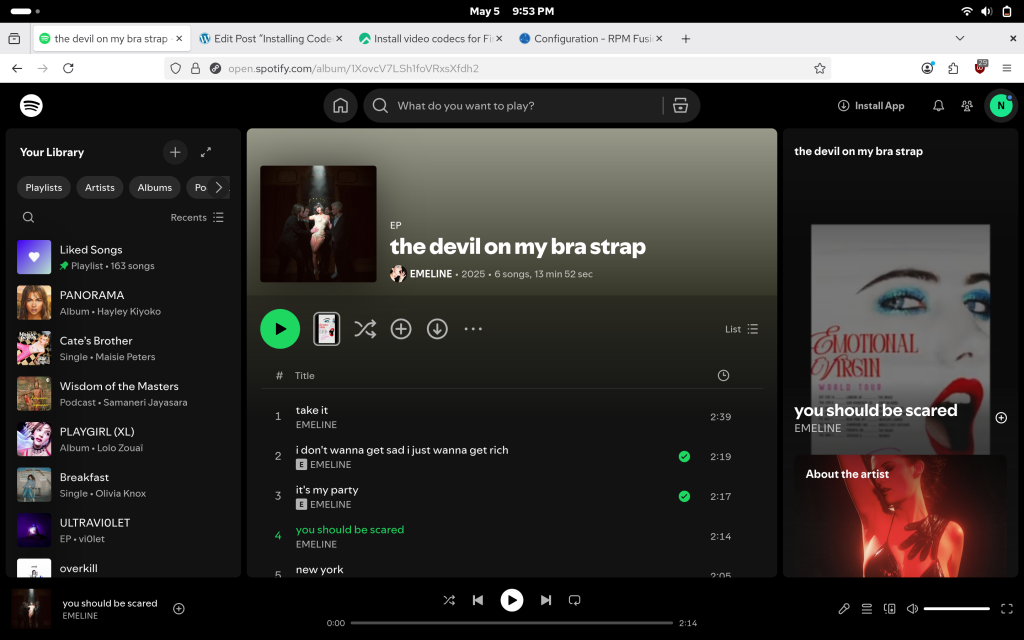
    A screenshot of Rocky Linux 10 and Firefox playing Spotify via RPM Fusion cocecs. More specifically, Emeline's song 'you should be scared'.
  • How I recovered from Mastodon/Fediverse (actually Akkoma) database corruption

    I moved domains again, this time from sour.coffee to momandpop.network. I also run Fediverse servers.

    Why so quickly? In the typical AuDHD fashion, I didn’t like sour.coffee too much.

    I run a VPS host for a living, and have two VPSes running not-Tor exit relays: one running my legacy neelc.org domain (running Rocky Linux 9) and one running the newer domains (running Rocky Linux 10).

    I decided to “migrate” to momandpop.network by setting up Akkoma on the “legacy” VPS via Docker. Initially, it went smoothly. Well, until I wanted to migrate to the non-legacy VPS.

    What did I encounter?

    db-1      | chmod: /var/run/postgresql: Operation not permitted
    db-1      | 
    db-1      | PostgreSQL Database directory appears to contain a database; Skipping initialization
    db-1      | 
    db-1      | 2026-04-05 22:03:26.747 UTC [1] LOG:  starting PostgreSQL 14.22 on x86_64-pc-linux-musl, compiled by gcc (Alpine 15.2.0) 15.2.0, 64-bit
    db-1      | 2026-04-05 22:03:26.747 UTC [1] LOG:  listening on IPv4 address "0.0.0.0", port 5432
    db-1      | 2026-04-05 22:03:26.747 UTC [1] LOG:  listening on IPv6 address "::", port 5432
    db-1      | 2026-04-05 22:03:26.748 UTC [1] LOG:  listening on Unix socket "/var/run/postgresql/.s.PGSQL.5432"
    db-1      | 2026-04-05 22:03:26.750 UTC [14] LOG:  database system was shut down at 2026-04-05 20:33:08 UTC
    db-1      | 2026-04-05 22:03:26.750 UTC [14] LOG:  invalid magic number 0000 in log segment 000000010000000000000001, offset 0
    db-1      | 2026-04-05 22:03:26.750 UTC [14] LOG:  invalid primary checkpoint record
    db-1      | 2026-04-05 22:03:26.750 UTC [14] PANIC:  could not locate a valid checkpoint record
    db-1      | 2026-04-05 22:03:26.914 UTC [1] LOG:  startup process (PID 14) was terminated by signal 6: Aborted
    db-1      | 2026-04-05 22:03:26.914 UTC [1] LOG:  aborting startup due to startup process failure
    db-1      | 2026-04-05 22:03:26.921 UTC [1] LOG:  database system is shut down

    In short, database corruption.

    While typically you could run pg_resorewal. But when I tried that, it left Postgres in a non-operable state.

    I’m just grateful that

    • The signing keys weren’t lost
    • If you have signing keys, your “followers” will re-sync
    • Nothing of significance was posted to Fedi from my “new server”

    The second point is how some Mastodon administrators migrated to GoToSocial. I in fact initially used GTS before migrating to Akkoma.

    I had a feeling this would eventually happen, but at least it didn’t happen on an “established” server. I’m not a Postgres fan myself, I actually prefer plain-old MariaDB/MySQL.

    And if you want to follow me on Fedi/Mastodon, I’m @noc@momandpop.network.

  • Doing VLAN trunk and access ports on MikroTik CRS/RouterOS

    Most of the switches in my homelab are MikroTik CRS switches, although I am getting a UniFi PoE switch (MikroTik didn’t make a 2.5G PoE switch, that’s why).

    I use two CRS304-4XG-IN switches to connect desktop computers to the 10G LAN, but wanted my desktops on a separate VLAN.

    On my network, I use VLAN 4 for desktops.

    The configuration you need is:

    /interface bridge
    add admin-mac=XX:XX:XX:XX:XX:XX auto-mac=no name=bridge vlan-filtering=yes
    /interface bridge port
    add bridge=bridge comment=defconf interface=ether1
    add bridge=bridge comment=defconf interface=ether2 pvid=4
    add bridge=bridge comment=defconf interface=ether3 pvid=4
    add bridge=bridge comment=defconf interface=ether4 pvid=4
    add bridge=bridge comment=defconf interface=ether5
    /interface bridge vlan
    add bridge=bridge tagged=ether1 untagged=ether2,ether3,ether4 vlan-ids=4

    The bold parts are important, and I will explain what they are:

    • vlan-filtering=yes in the /interface bridge means you will filter for VLANs. This is required for VLAN trunk/access ports.
    • pvid=4 in the /interface bridge port means the specific port will use VLAN 4.
    • tagged=ether1 in the /interface bridge vlan means the trunk/tagged port is ether1.
    • untagged=ether2,ether3,ether4 means the ether2-4 ports are access ports
    • vlan-ids=4 means we are establishing a bridge on VLAN 4.

    Hopefully, this helps you set up VLAN trunking on a MikroTik CRS/RouterOS switch.

  • Running WPA3-Enterprise in my home network

    It’s no secret that by now, most home networks use WPA-Personal. Why? It’s a simple password. This included mine. Well, until today.

    I always wanted to try WPA3-Enterprise in my home network, at least on the SSID/VLAN for my devices (versus the rest of my family). The roadblock was FreeRADIUS not working with Samba and MS-CHAPv2, it was a permissions issue (I don’t want to pirate Windows Server).

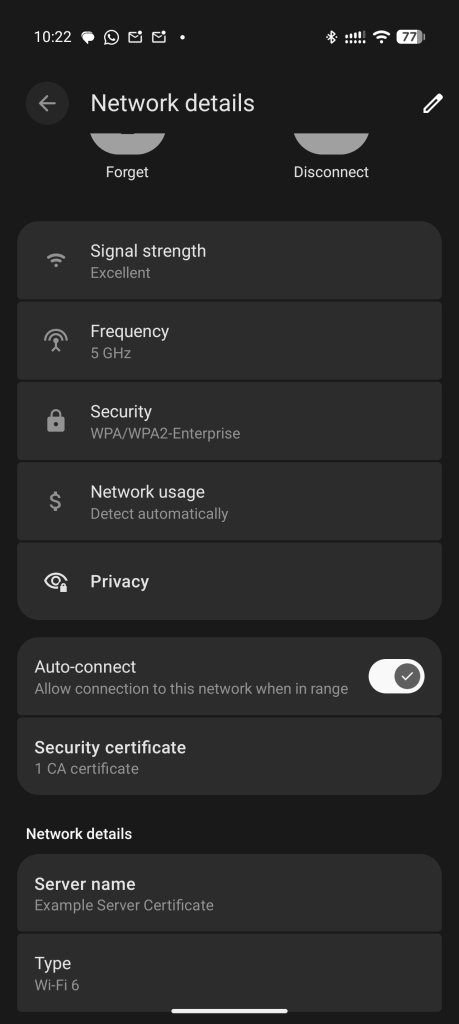
    So here’s me connected to my WPA-Enterprise on my phone:

    Why?

    While I know the reasons for WPA3-Enterprise in an office network, it seems overkill for a home network. So why do it?

    Because I can.

    It’s easy enough to do on a Incus UniFi controller. After all, I have a cluster of MikroTik 10G equipment when I could just rent an ISP-provided router and extender like a Joe and focus on “AI” instead.

    Well, I’m done.

  • Cloning a Calix GPON ONT or Quantum Fiber SmartNID

    WARNING: This guide is for instructional purposes only. I am not responsible for any damages caused by this guide. This guide may violate your ISP’s terms of service and is possibly illegal. Proceed at your own risk. I also no longer live in CenturyLink/Quantum territory.

    While I now live in Verizon territory (and lack Verizon FiOS at the moment), when I lived in Seattle and got CenturyLink Fiber (now Quantum Fiber), I initially had an issue which looked like “latency spikes and packet loss”.

    Little did I know that the ONT (Optical Netowrk Terminal) given, a Calix 716GE-I R2 has a hard cap of 16384 TCP sessions, not unlike AT&T Fiber/U-verse routers. Even lesser known is that it’s very easy to clone Calix ONTs with just a JTAG cable and the Calix 803G doesn’t have the issue.

    CenturyLink Fiber then got rebranded as Quantum Fiber which uses SmartNIDs and DHCP, and then sold to AT&T. However, I had a CenturyLink-branded service with a Calix ONT at the time and moved eastwards before I could be switched over.

    Note: This is not for AT&T Fiber itself using a Nokia ONT or BGW320/BGW620. I never had AT&T Fiber, outside of Frontier FiberOptic GPON in Connecticut for a few months which inherited 802.1X from AT&T. Check the 8311 Discord server for AT&T Fiber proper.

    So you want to clone your ONT?

    Pre-requisites

    You need the following devices information:

    • Original, ISP-provided Calix ONT or SmartNID with the ONU MAC and FSAN Serial ready
    • If required, your GPON Password. CenturyLink/Quantum doesn’t use this
    • Calix ONT being cloned to
    • JTAG serial adapter

    About the JTAG adapter, the CP2102 models are recommended. Other models have had issues with Calix’s JTAG console.

    Cloning the ONT

    Now for the fun part.

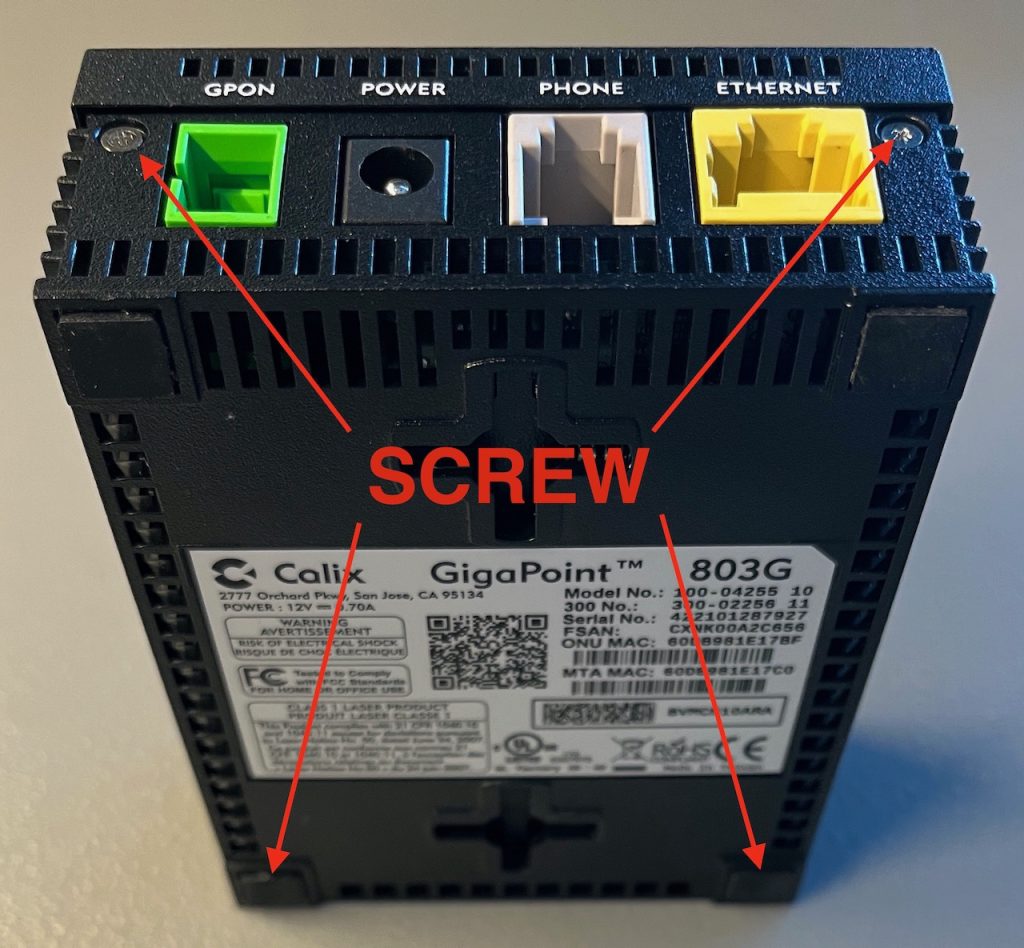
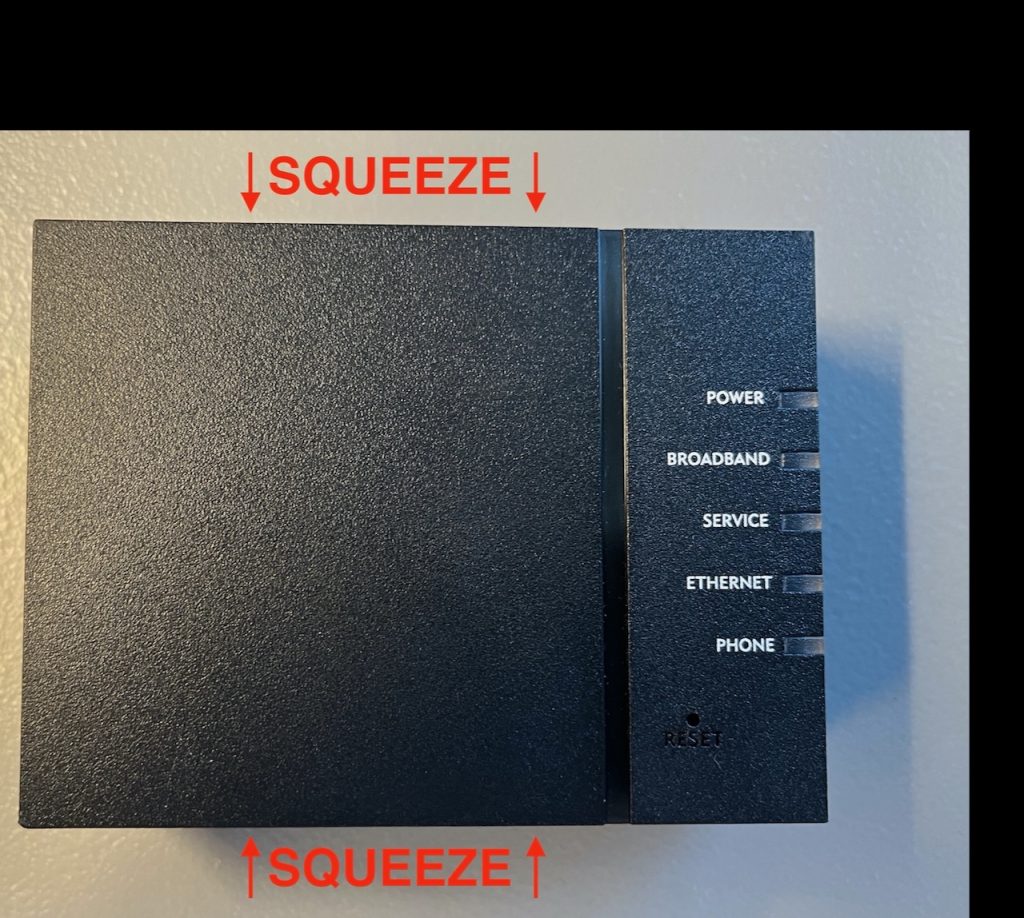
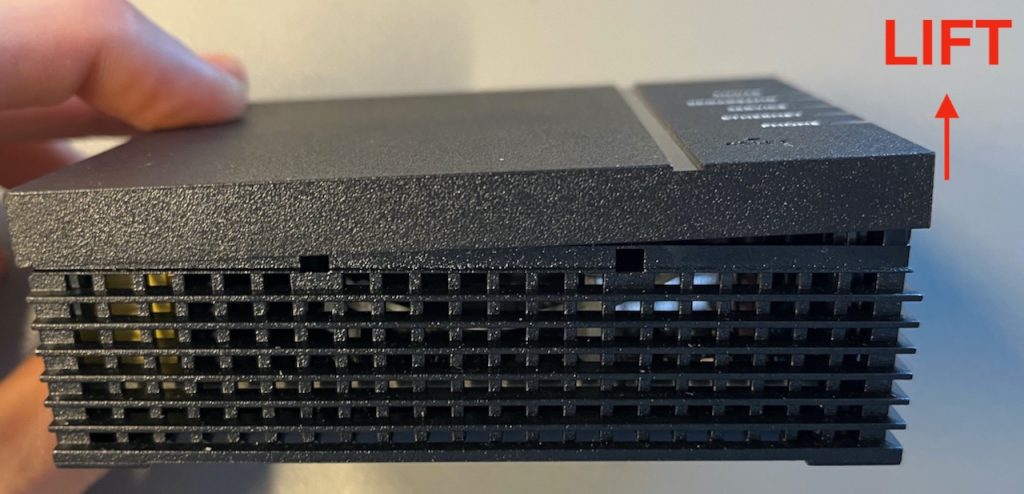
    First off, you need to open your ONT.

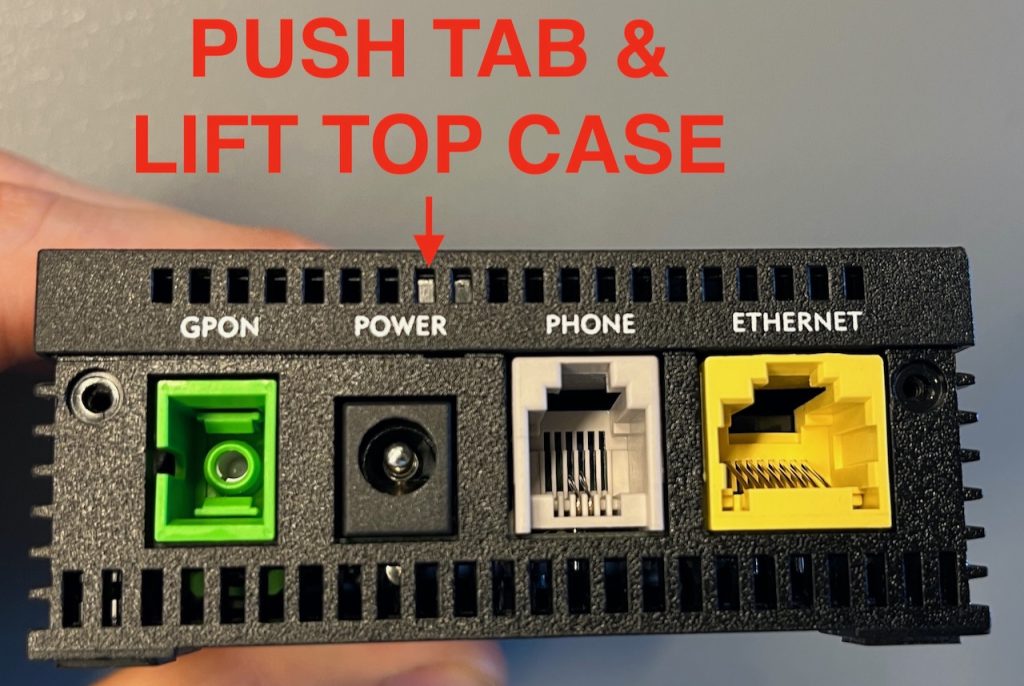
    For the 803G (the destination ONT), these images should be self-explanatory.

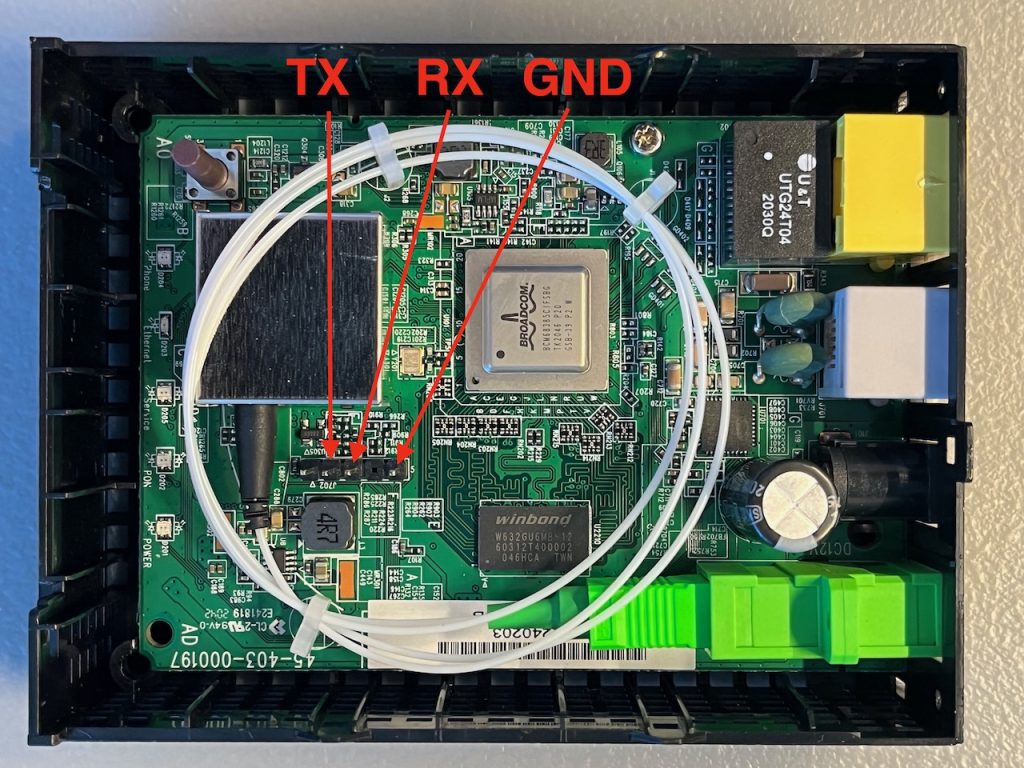
    When you are inside, connect the JTAG.

    Note: The TX should go to your JTAG RX and vice-versa.

    Image source: fire-foo.com.

    When you connected your JTAG header pins, open a serial console (e.g. cu or PuTTY), plug in the power while hitting ESC on your keyboard repeatedly.

    When you are on the CFE> prompt, type b and press enter.

    Press enter for most of the values, except the Base MAC Address and GPON Serial Number which should be the ONU MAC and FSAN Serial respectively from your source ONT.

    Some ISPs may need a GPON password, but CenturyLink/Quantum does not. I do now know how to get the GPON password as I was never in that scenario.

    Once you are done, wait for the ONT to boot successfully, then turn off the power, close the ONT, and plug the fiber and power in place of your stock Calix ONT.

    An example of a JTAG session can be seen here.